/prod01/fit-cdn-pxl/media/fit-website/site-assets/images/FT-Horiz_crimson-gold.png)
/prod01/fit-cdn-pxl/media/site-specific/wwwfitedu/career-services/images/students-campus.jpg)
For questions concerning the Federal Work-Study Program (FWS), contact:
- fws@fit.edu or 321-674-8102 for general questions
- Contact HR for issues with Workday or applications: 321-674-7427 or hr@fit.edu
- Stop by Denius Student Center, Room 150 (behind the bookstore) if you would like someone to show you how to apply to jobs
What is Federal Work-Study?
Federal Work-Study (FWS) is an employment program which allows students to earn a paycheck through a financial aid award paid by federal funds. Since it is federal money, students must receive the award from Financial Aid each academic year (Fall through Spring), and they must be paid hourly (for actual hours worked). Students can spend their earned wages on anything and can only earn up to their award amount (earnings are not applied to tuition).
Eligibility: FWS awards are given by the Financial Aid Office to U.S. citizens and permanent residents who qualify based on their FAFSA, if you have questions about eligibility reach out to Financial Aid, finaid@fit.edu. The program provides part-time employment opportunities in two areas, On-Campus & Community Service.
1. Check your Financial Aid Package to Accept Your Award
Each student will receive an award amount in their Financial Aid Package, this is the amount you can earn for both Fall & Spring. If you have questions about your award, contact Financial Aid.
2. Log In to Workday to Apply to a Job
 Use your TRACKS login on Workday; you must be on the campus network to view all positions
- Use Chrome browser on a PC to avoid application errors
- Many students may only apply (submit documents) if they are on the "eduroam" campus wifi
- In the top search bar, enter "Find Student Jobs" and click on the jobs report
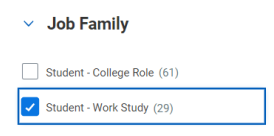
- Apply to positions marked 'FWS only'; you can filter for these under "Job Family" and select "Student - Work Study"
- Each department has different interview procedures and will send an offer through Workday. You may reach out to the supervisor listed on the job for questions about the position
3. Complete Any Hire Paperwork
- New Students: You will complete an I-9 and W-4 in Workday and go to the HR office on campus to show your original IDs. Be sure to bring at least one ORIGINAL from the following list from home (copies are not acceptable): Form I-9 Acceptable Documents | USCIS. (You only need one ID from list A OR if you don't have those IDs, you must have one from List B & one from List C.
- All Students: Update your Check Address or Direct Deposit in Workday
4. Start Date Will Be Confirmed by Human Resources
If you have questions about the Workday system or your application status, contact hr@fit.edu.
There are numerous on-campus work-study employment opportunities for eligible students. Students may choose where they want to apply; there is a surplus of positions which ensures there will always be a job available for every student. Some jobs may have qualification requirements, such as having a lifeguard certification or a required major for a lab/research position.
Example Jobs:
- Library Help Desk Assistant
- Mailroom Clerk
- Lab Assistant
- Student Ambassador (Tour Guide)
- Vertex (manufacturing) Technician
- Research Assistant
- Student Life Activities Assistant
The Community Service program provides off-campus, part-time employment to eligible students. The work must be performed with a non-profit agency that is contracted with Career Services. Students are responsible for transportation to their job site, but most sites are very close to campus.
Off-Campus Community Service Sites:
- University Park Elementary: Afterschool Tutor in English & Math
- Tutor elementary students in 1-6 grades from 3-5pm (0.5 mile from campus)
- Rolling Readers: Elementary Classroom Reading Leader
- Be assigned to an elementary classroom to lead reading time and tutoring during school hours
- Groundswell Startups: 3D Printing Technician/Business Assistant
- Assist entrepreneurs and tech startups with product creation (2 miles from campus)
1. Check your Financial Aid Package to Accept Your Award
- Each student will receive an award amount in their Financial Aid Package, this is the amount you can earn for both Fall & Spring. If you have questions about your award, contact Financial Aid.
2. Log In to Workday to Apply to a Job
- Use your TRACKS login on Workday; you must be on the campus network to view all positions
- Use Chrome browser on a PC to avoid application errors
- Many students may only apply (submit documents) if they are on the "eduroam" campus wifi
- In the top search bar, enter "Find Student Jobs" and click on the jobs report
- Apply to positions marked 'FWS only'; you can filter for these under "Job Family" and select "Student - Work Study"
- Each department has different interview procedures and will send an offer through Workday. You may reach out to the supervisor listed on the job for questions about the position
3. Complete Any Hire Paperwork
- New Students: You will complete an I-9 and W-4 in Workday and go to the HR office on campus to show your original IDs. Be sure to bring at least one ORIGINAL from the following list from home (copies are not acceptable): Form I-9 Acceptable Documents | USCIS. (You only need one ID from list A OR if you don't have those IDs, you must have one from List B & one from List C.
- All Students: Update your Check Address or Direct Deposit in Workday
4. Start Date Will Be Confirmed by Human Resources
If you have questions about the Workday system or your application status, contact hr@fit.edu.
You must have completed a FAFSA to receive the award from Financial Aid. Contact finaid@fit.edu if you have any questions about your award amount or any changes to your award. Financial Aid may change or cancel your award based on new eligibility info.
- You MAY NOT earn more than your award. It is your responsibility to track your earnings (totals are given on each pay stub). You must stop working when your award ends.
- You MUST earn your award by working. You are not guaranteed this money by Financial Aid, you are paid hourly to receive the award through a paycheck. It is up to you to pick a job that meets your schedule and how many hours you would like to work. You also may not volunteer for your paid job, you must be paid for all your worked hours.
- Complete your timesheet to get paid! Timesheets are due in Workday every 2 weeks. If you miss the deadline, you will miss your check! You will then need to enter corrected hours and wait another pay period to be paid.
At the end of January, W-2 wage forms will be available in WorkDay for the prior year. If you are unsure if you must pay taxes, see a tax professional. All earnings in the US are subject to IRS rules based on your total earnings for the year.
Work Study is active in the Fall & Spring semesters; all jobs end on May 8, 2026.
Reasons your job may be ended before May:
- You have exhausted all of your award amount
- You graduate in the Fall or withdraw from the university
- You voluntarily resign (notify your supervisor)
- You are terminated for not following HR conduct policies
For questions about Workday and application issues, contact: hr@fit.edu.
Frequently Asked Questions
Your FWS award is the total amount of money you can potentially earn within the traditional academic year (Fall & Spring semesters), the amount is awarded based on your FAFSA and Financial Aid package limits. It is not guaranteed money. The rate at which you earn this amount will depend on your hourly pay rate and how many hours you work. You do not have to earn all of it, any unearned money is kept in the Federal Fund and does not affect what you receive the following year.
NO! FWS requires that a supervisor be present to work, so take-home work or remote work is not allowed. You are to work on projects or activities for the university and not personal projects (such as senior design projects). If you never see your supervisor or only a GSA is present with you, contact fws@fit.edu.
Students will receive a paycheck bi-weekly (must complete your timesheet in Workday by the deadline). This money does not go towards tuition, since these are earned wages you can use the money on whatever you choose.
If your office is open during a holiday or weekend (supervisor must be present!) students may work during these periods. During non-class periods (holiday breaks) students may work up to 40 hours per week. All positions end May 8, there is no FWS in the summer.
When you’ve maxed out your earnings, your position will end, and you must stop working immediately. It is YOUR responsibility to track how much you’re earning and not go over your award (Totals are given on each pay stub in Workday). Any money you earn in excess of your award will be paid back by either you or your department.
No. You may not work until your authorized start date, sent to you and your supervisor in WorkDay. You will not receive a timesheet until your start date.
Once you receive an offer in WorkDay, you will need to complete onboarding tasks with HR, which includes your I9, W4, and Direct Deposit. Depending how quickly you complete these steps, it could take a week or more to be processed. Contact hr@fit.edu to check on the status of your hire.
There are more jobs than students to fill them, so you are guaranteed a job. However, some departments may be popular and fill all their spots, if this happens go to your next choice. You may apply to any positions marked ‘FWS Only’ or ‘FWS Eligible’ on WorkDay. Postings will continue to be updated as jobs are added and closed.
Many factors can change your eligibility (such as receiving new scholarships or dropping below half time in classes). Speak directly with Financial Aid to find out the reason.
You may only work one job at a time in the FWS program (however, you could have an additional job through other programs like College Role or off-campus). You can change jobs at any point in the semester by informing your current supervisor of your resignation and applying to a new FWS job in Workday.
Yes, this is a real job hired by university and can be taxed. You must follow all HR conduct policies to keep the job and are expected to call out of your shift ahead of time with your supervisor. You can list FWS as a work experience on your resume
Communicate with your supervisor if you are having any issues or payment problems. If you are having an issue with your supervisor or the problem is not resolved, contact Human Resources at hr@fit.edu or 321-674-7427.