/prod01/fit-cdn-pxl/media/fit-website/site-assets/images/FT-Horiz_crimson-gold.png)
/prod01/fit-cdn-pxl/media/general-use-photos/ThinkstockPhotos-611992272.jpg)
Crediting Participants for an On-Campus Study
Log in to Sona Systems.
- Click on My Studies
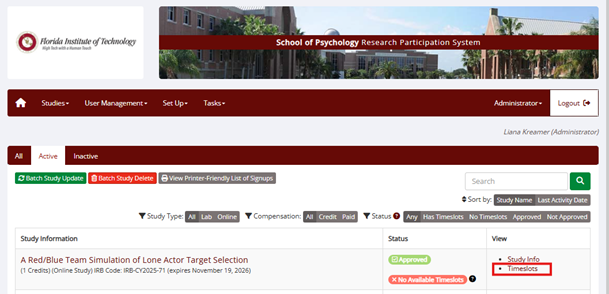
- Click on Timeslots for the specific study of interest.
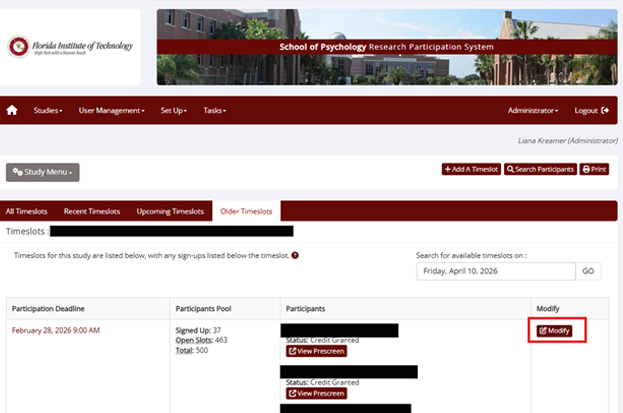
- Click on Modify
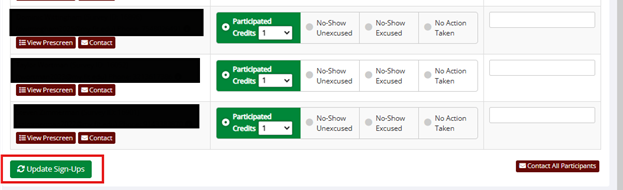
- Choose an option and then click Update Sign-Ups:
- Participated, if individual completed your study.
- Unexcused no-show, if individual did NOT show up for your research session AND did NOT contact you beforehand to let you know that he/she would be absent. The system keeps track of unexcused no-shows and when a student receives 3 of these, the student is no longer allowed to use Sona Systems.
- Excused, no-show, if individual did NOT show up for your research session BUT did contact you beforehand to let you know that he/she would be absent. This is also an option to use (as is "Cancel") if the researcher had to cancel the session.