

Posting Timeslots for an Online Study
Log into Sona Systems. If you do not have a Researcher account, see Requesting a Researcher Account.
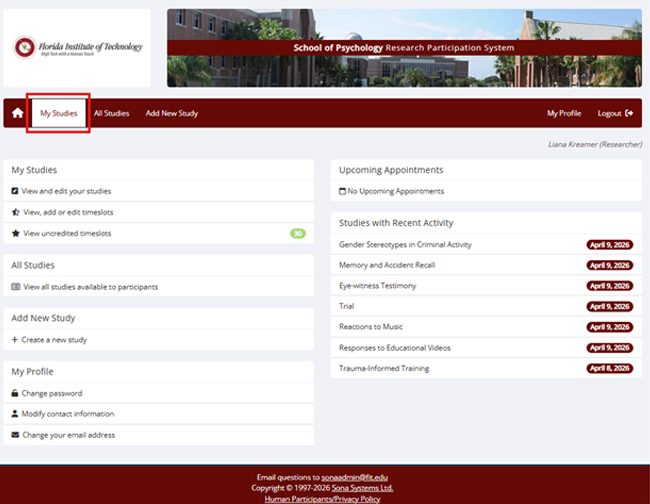
- Click on My Studies.
- Study must be approved (look for check mark).
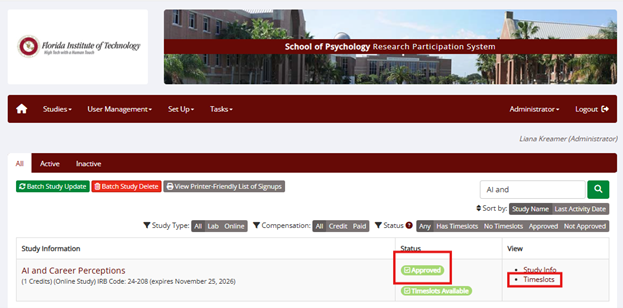
- Click on Timeslots.
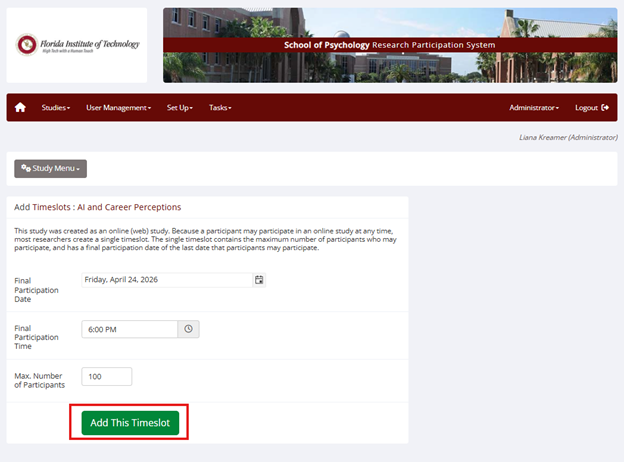
- Click on Add a timeslot. If you already have timeslots, scroll down.
- Indicate the last date individuals may participate in your online study, and the number of maximum participants.
- This timeslot will shut off once you reached the maximum number of participants or once the date you set has past.
- Click Add this timeslot.
- If participants can sign up outside Sona Systems, but you want to grant them in Sona Systems, click on My Studies, click on timeslots, click on modify, then scroll down to manual sign up, and enter participant's last name.