/prod01/fit-cdn-pxl/media/fit-website/site-assets/images/FT-Horiz_crimson-gold.png)
/prod01/fit-cdn-pxl/media/general-use-photos/ThinkstockPhotos-611992272.jpg)
Setting up an On-Campus Study
Log in to Sona Systems. Faculty members automatically have an account and can set up studies. GSA must request one (See Requesting a Researcher Account).
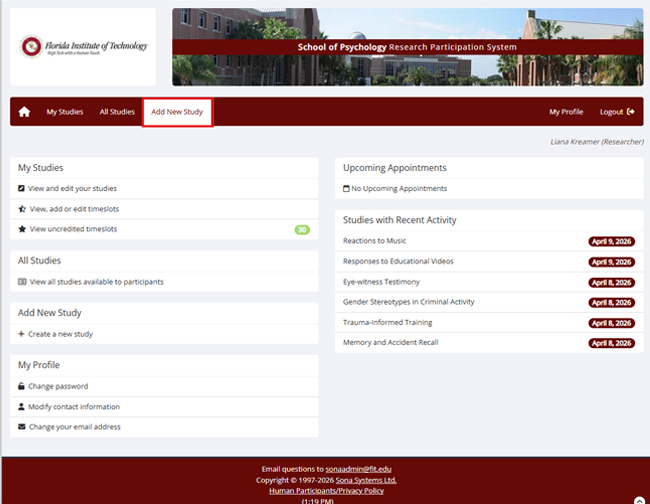
- If your study has been approved by the IRB, click on Add New Study.
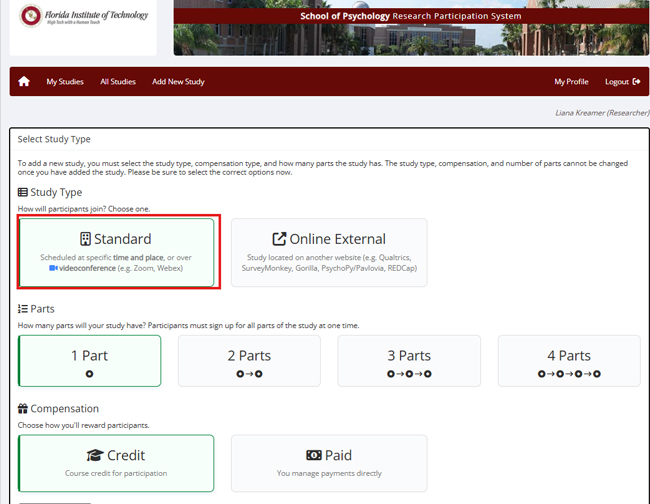
- Click on Standard Study. If your study is located on campus, then click continue.
- Fill in the study's name (use something innocuous and not too enticing for students)
- If you want all Intro to Psychology students to participate, leave the eligibility requirement blank
- If you want only international students or only students who work full-time, etc., write the requirement in the space.
- Credits to participants will be given as follows: 1 for showing up and 1 for each half hour
- If your study lasts 30 minutes, participants will receive 2 credits.
- If your study lasts 31-60 minutes, participants will receive 3 credits.
- For most studies, leave the Preparation box blank. This is for studies where students may be required to bring something special or pre-read some material.
- The Researcher is the person conducting the study - usually a graduate student or undergraduate research assistant.
- Select a Principal Investigator from the list.
- If you are a faculty member, it would be your name.
- If you are a graduate student or undergraduate honors student, it would be the professor's name you work under.
- You will need your five-digit IRB approval code and the IRB expiration date. Once your IRB expiration date rolls around, your study will be moved from the list of active studies to the list of inactive studies until you are granted a new IRB expiration date.
- Select "Yes" under Active Study, if you want to post time slots for your study.
- Leave the defaults to none, if you don't have pre-requisites, disqualifiers, or restrictions.
- Leave invitation codes blank (generally used only for online studies).
- Deadlines: we recommend 2 hours.
- Participants will not be able to sign up for or cancel a study 2 hours before it takes place. If no one signs up 2 hours before the study is scheduled, the study is cancelled (learn more about no-shows under Crediting Participants).
- It is recommended to sign up for automatic email updates for sign-ups and cancellations, which means you don't have to sign in to Sona Systems to see whether someone has signed up or cancelled.
- You can assign specific researchers to specific timeslots if necessary, but generally you can leave this box checked as "No."
- Only in very rare circumstances would you want to allow a student to participate in your study more than once; leave "No" checked.
- Click Add This Study.
NOTE: You are NOT finished yet. A different page will come up.
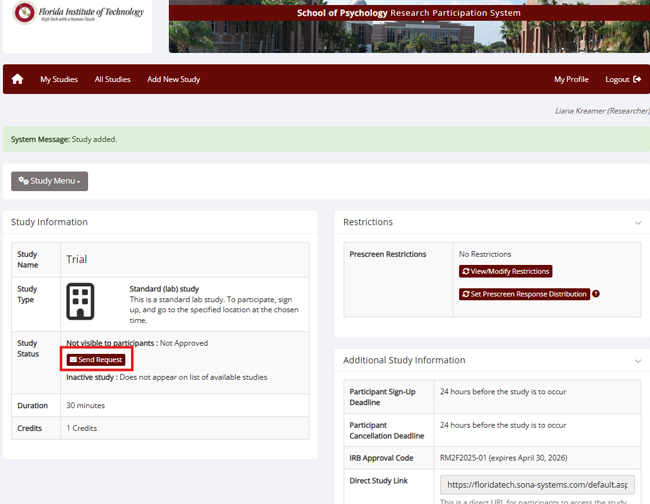
- In order for your study to be visible to students, under the "Study Status" section in the middle of the page, click Send A Request. If you don't click this link, the administrator will not be informed that you wish to add a study. The administrator will be notified and will approve your study, or suggest changes, within 24 hours.
- You will receive a notification once the study has been made visible to students.
- Now you are ready to add timeslots.